
This sample contains example code that demonstrates much of the functionality of Solid Framework
This sample contains all that you need to get started using C++ with Solid Framework. The video demonstrates running the sample code on Windows using Visual Studio, but the same sample can be compiled and run on Linux using QtCreator.
This documentation (though not the video) was checked with Visual Studio 2019 on 23rd September 2026.
-
- Download a license from solidframework.net. The license is not included in the sample, so you need to download your own. (This step is covered in the tutorial video “Getting started with Solid Framework”.)
- Download the sample C++ Tutorial code, which is a zip file, and extract its contents. This creates a C++ Tutorials folder with the tutorial files and an empty SolidFramework folder. The Solid Framework SDK is not included in the sample.
- Download the latest version of SolidFramework for the platform you are building for. You will want either the 32 or 64 bit native library. Arm libraries are also available, including for OSX.
- Extract the contents of the SolidFramework package into the SolidFramework folder inside the C++ Tutorials folder.
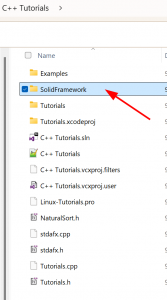
- The SolidFramework folder should now contain SolidFramework.cpp, SolidFramework.h and a folder named after the target platform: Win32, Win64, Linux or OSX.
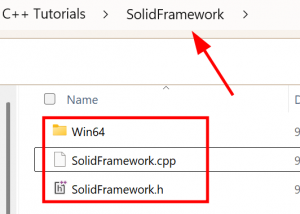
- If the binaries do not match the platform and architecture you are building for, or some files are missing, the sample stops with an error like the one below. In this example the Win32 configuration was built, but the SolidFramework folder only contained the Win64 folder.

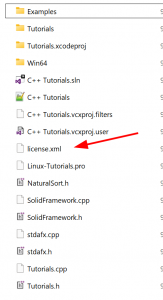
- Copy the license.xml file you downloaded into the C++ Tutorials folder, next to the SolidFramework folder.
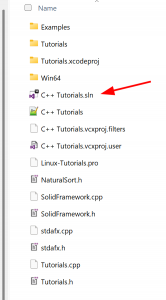
- Open the C++ Tutorials.sln file in Visual Studio.
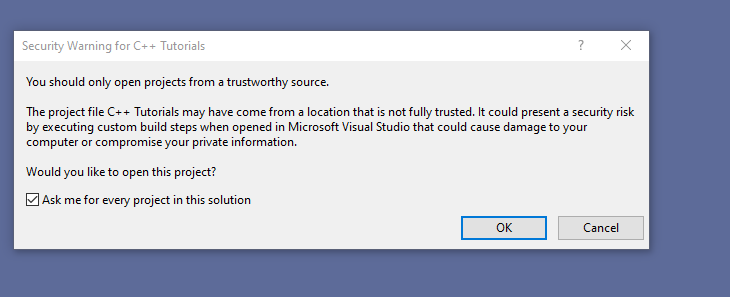
- You may be warned to only open projects from a trustworthy source. This is because the file came from the Internet. Press OK.
- The solution should then build successfully within Visual Studio.
- Run the project.