
Using the Solid Framework C++ Sample
These following samples can be downloaded and installed as-is with a Solid PDF Tools unlock code to quickly review the functionality. Without an unlock code the application will convert but watermark all output.
If you do not have a Solid PDF Tools license please contact support@soliddocuments.com for a license for the purpose of evaluating the SDK.
- Without OCR x86 Download the installer (10MB)
- Without OCR x64 Download the installer (11MB)
- With OCR x86 Download the installer (30MB)
- With OCR x64 Download the installer (31MB)
The source code and SDK for this sample is provided in the form of 2 zip files, the project file below and the Solid Framework C++ for Windows SDK zip file, available from the developer portal (self-service). This will not work with a Solid PDF Tools Unlock Code. This sample project can be explored as a reference implementation, built and run.
Steps for Using the C++ Sample with Visual Studio
- Create a free portal account, and generate a Developer SDK license.
- Download the Solid Framework C++ for Windows SDK from the Download Portal.
- Download the SolidConverter-Native.zip sample file and extract its contents. This creates a SolidConverter-Native folder with the sample source code and an empty SolidFramework folder. The Solid Framework SDK is not included in the sample.
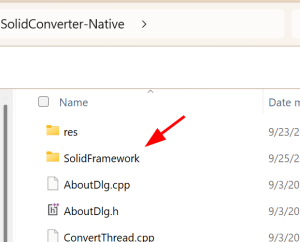
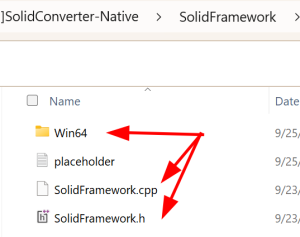
- Extract the contents of the Solid Framework SDK zip file into the SolidConverter-Native\SolidFramework folder. Check that this folder now contains the SolidFramework.cpp and SolidFramework.h files, and a folder with the correct bitness for your project: Win32 for x86 or Win64 for x64. The placeholder file that comes with the sample can be ignored.
- Open SolidConverter-Native\SolidConverter.sln in Visual Studio.
- Right click on SolidConverter-Native project and select Rebuild. NOTE if you get build errors saying “Cannot open include file: ‘SolidFramework.h” then please check that you have extracted the SDK into the SolidFramework folder as described above.
- Hit F5 to run the project.
- When the form loads, click on the “Question Mark” in the upper right, then click Unlock.
- Enter your license details from your Solid Framework license. After unlock, you are able to use the sample to convert PDF files. NOTE if you don’t unlock the product it will fail with an invalid license error
Note: Only the 32 bit (x86) or the 64 bit (x64) version of the Solid Framework Native SDK is required depending on which configuration you decide to build and support.