Solid Framework with Solid OCR can be used to access the content of your image file. Solid OCR will scan through the file and reconstruct clean Unicode text, lines, boxes and images, in reading order, and provide the co-ordinates of the file’s elements as well as their color and font attributes (if text).
This sample can export up to two files.
A Text file containing the scanned files information
A SVG (Scalable Vector Graphics) file
The source code for this sample is provided in the form of a zip file. Solid Framework for .NET is available from the developer portal (self-service).
Steps to Extracting Text from OCR – C# .NET Sample Application
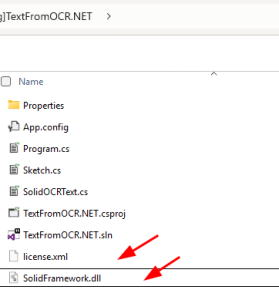
Download the Solid Framework .NET dll into the sample root directory (the TextFromOCR.NET folder that contains TextFromOCR.NET.csproj).
Open TextFromOCR.sln in Visual Studio.
Right click on your project and choose Properties.
From the Debug option in the Command line arguments type in the full file path in this order for the following files:
Your Solid Framework license.xml file
Your source scanned file
The file path and name you want your created .svg file to be created. For example C:\…\TextFromOCR.NET\outputSVG.svg
The file path and name you want your created .txtfile to be created. For example C:\…\TextFromOCR.NET\outputFile.txt.
Example of full Command line arguments: C:\…\TextFromOCR.NET\license.xml C:\…\TextFromOCR.NET\sample2.tif C:\…\TextFromOCR.NET\output.svg C:\…\TextFromOCR.NET\outputFile.txt
Save then Right click on the project and select Rebuild.
We use cookies to offer you a better browsing experience, session state and analyse site traffic. If you continue to use this site, you consent to our use of cookies.