
This sample contains example code that demonstrates much of the functionality of Solid Framework
This sample contains all that you need to get started using C# with Solid Framework.
- Download a license from solidframework.net.
- Download the latest version of SolidFramework. We recommend the AnyCPU version of the library.
- Download the sample C# Tutorial code which is a zip file.
- Extract the contents of the zip file.
- Copy the SolidFramework.dll that you downloaded into the project folder (the folder that contains CSharp Tutorials.csproj).
- Copy the license.xml file into the project folder.
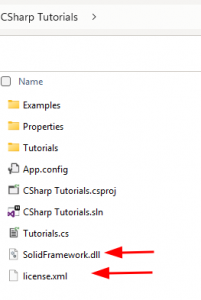
- The solution should then build successfully.
- Run the project.