
PaddleOCR can be used with Solid Framework to seamlessly access and extract the content of your image files and scanned documents. It automatically scans through each page to detect text regions, corrects the page orientation, and reconstructs highly accurate, clean Unicode text across multiple languages.
The source code for this sample is provided in the form of a zip file. Solid Framework for .NET is available from the developer portal (self-service).
Steps to Extracting Text with PaddleOCR – C# .NET Sample Application
- Download the PaddleOCR.NET sample and extract it. This creates a PaddleOCR.NET folder with the sample project. In the following steps, the folder that contains PaddleOCR.NET.sln is called the sample root folder.
- Download the latest version of SolidFramework.dll and copy it into the sample root folder.
- Create a free portal account, generate a Developer SDK license and copy the license.xml file into the sample root folder.
- Download the Tesseract models and extract them into the tessdata folder in the sample root folder.
- Download the PaddleOCR models and extract them into the paddleModels folder in the sample root folder.
- Download the ONNX Runtime library (choose the package for your operating system under Assets) and extract the library files into the ONNXRuntime folder in the sample root folder.
The sample root folder should now look like this:
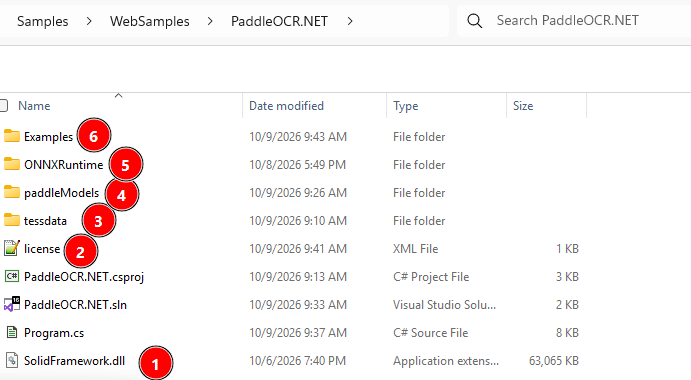
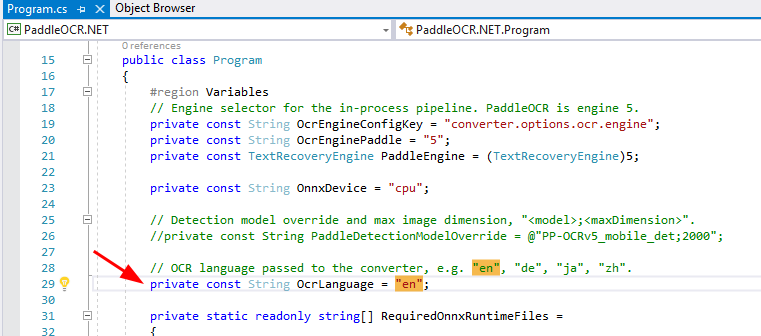
- The Examples folder contains a scanned English PDF that the sample converts. Feel free to add more documents there. To convert documents in another language, change OcrLanguage in Program.cs, for example to “de”, “ja” or “zh”.
- Save then Right click on the project and select Rebuild.
- Press F5 to run the sample.